and their mixtures
Brief Version: If you are courageous and want to jump right in, you can connect to the physicalproperties.ai toolset using the instructions in the following section and then simply copy example prompts (blue text) from this page and paste them into your LLM's input control. (Hovering over a prompt will display a "copy" button in the lower right corner of the prompt display.)
Detailed Version:
PhysicalProperties.ai is a model context protocol (MCP) toolset that
integrates large language models (LLMs) with Cranium's physical property
management and estimation capabilities. You use the combined AI agent by
simply entering natural language queries about chemical properties and
letting the agent make the functional calls needed for property estimation
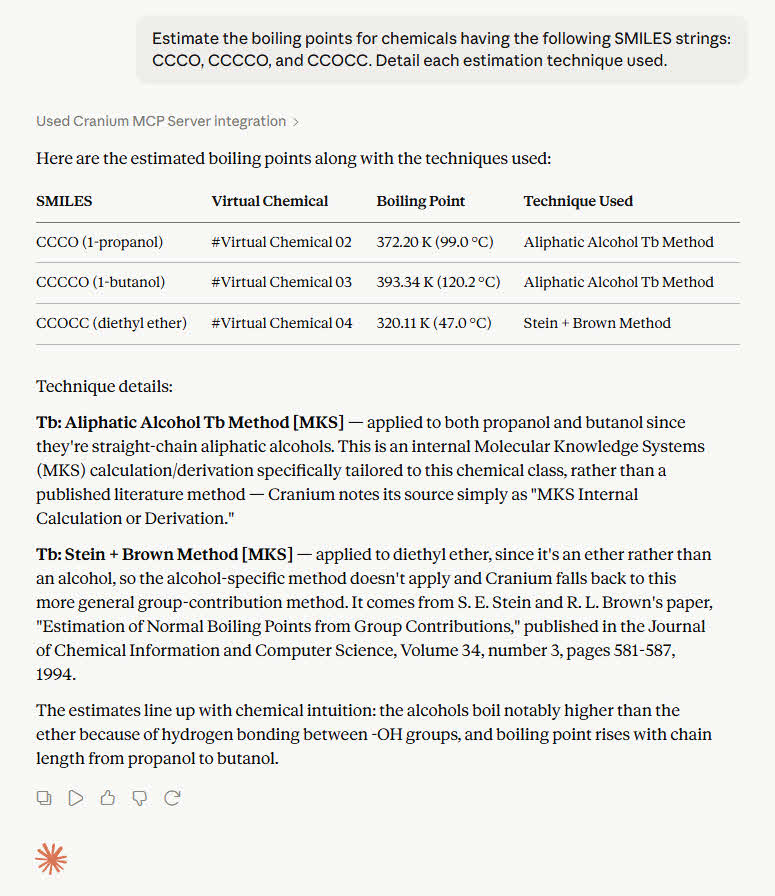
and data retrieval. For example, the image to the right shows the agent's
response, using Claude.ai as the LLM, to a request for the boiling points
of several chemicals given only their molecular structures, which were
provided as SMILES strings.
To begin using the physical properties AI agent, you will need to connect the physicalproperties.ai toolset to a large language model. Instructions for doing that are given in the next section. The remaining sections provide example queries for retrieving data, generating estimates, documenting techniques, and more.
Please explore the AI agent's capabilities and send us your comments and suggestions. We can envision many additions to physicalproperties.ai and are very interested in receiving your guidance.
The video to the right provides instructions for connecting to Claude.ai or Claude Desktop. Please contact us if you have any questions about connecting to Claude or another LLM platform.
The video can also be viewed on YouTube by clicking on the following link:
Cranium MCP Server - Connecting to Claude
During the connection process, you will be asked for the following information:
Server Name: Cranium MCP Server
URL: https://cloud.physicalproperties.ai/mcp
To test the connection, you should start by saying "hello to Cranium". If the connection is operating correctly, Cranium will response with a greeting and details about its currently used knowledge base.
Details will include the number of chemicals, estimation techniques, properties, and references as well as the number of virtual chemicals and mixtures. (Virtual chemicals and mixtures are discussed below.)
Tool selection and use: Note that when an LLM uses an MCP tool for the first time, it may prompt you for permission to use that tool. Also note that the tool the LLM selects to may not be the "best" tool. However, as your conversation with the LLM continues, it will learn which tools are "best" for responding to your queries and will use those tools more frequently.
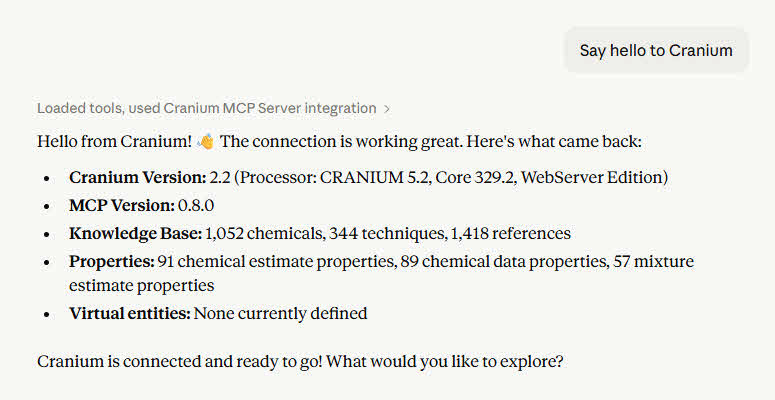
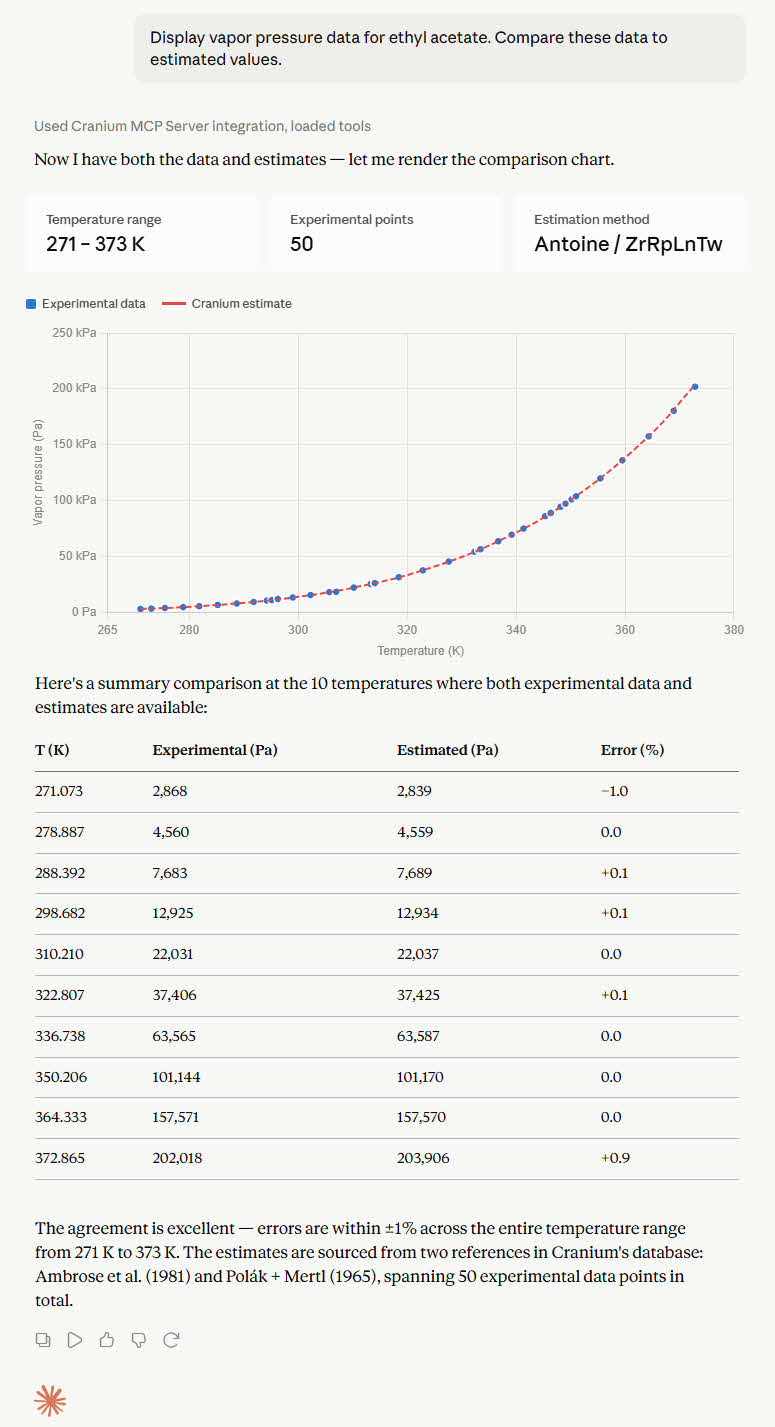
Cranium utilizes MKS's WebServer Knowledge Base to retrieve the information needed to process physical property requests. Currently, the knowledge base contains more than 1,100 chemicals, 300 mixtures, 350 estimation techniques, and 1,600 references. Agents can retrieve information on these entities as well as request estimated properties for chemicals and mixtures.
For example, the chat to right shows the response to the following prompt.
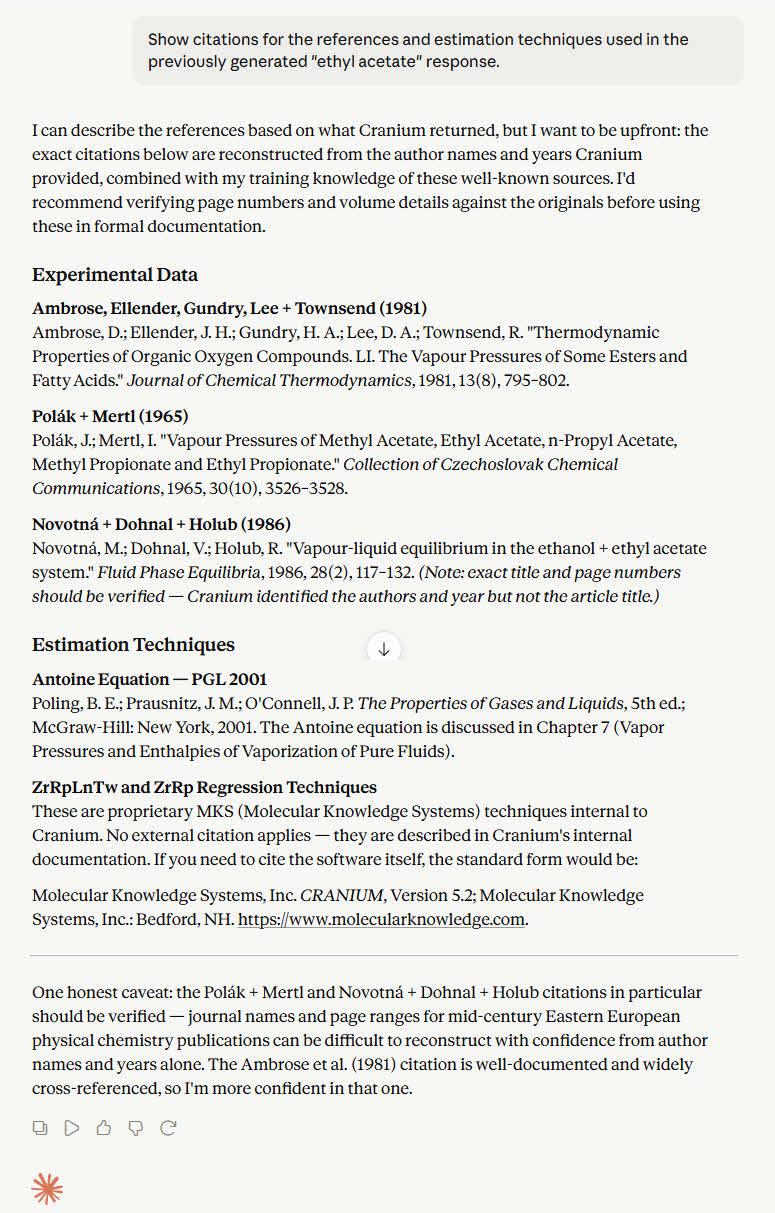
Every datum within an MKS Knowledge Base is tagged with the ID of its source reference. Every estimate is tagged with the name of the technique used to generate the estimate. Details about these source references and techniques can be requested by the agent.
For example, the chat to right shows the response to the following prompt. (Note that this prompt assumes it is entered after the "ethyl acetate" prompt above.)
Note that the LLM also provided additional details about the citations. Specifically, a prefix "warning" the user to verify the citations and a suffix further expressing the need for verification. This is a classic example of an LLM's ability to provide additional. (Which may at times be in conflict with the information provided by Cranium.)
Here are some examples of other common "chemical estimation prompts".
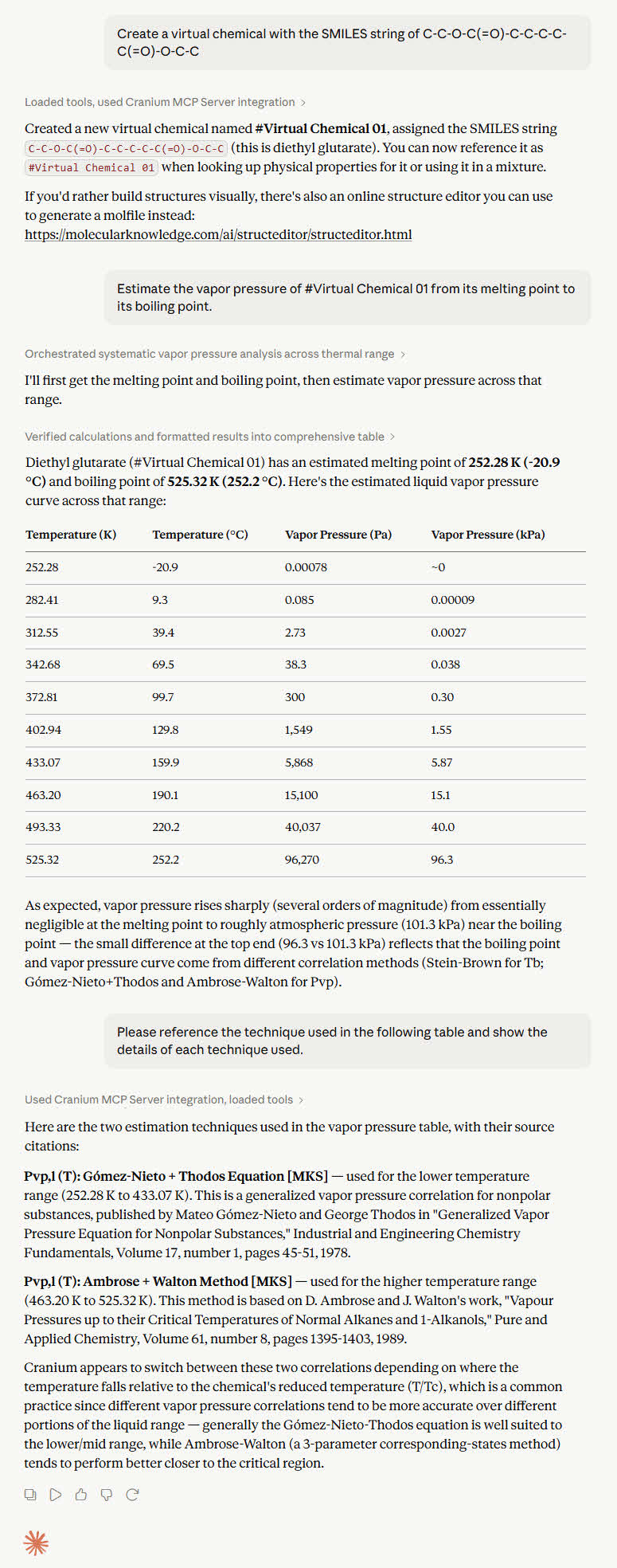
Cranium can estimate the physical properties of a new, user-defined chemical given only its molecular structure. Such user-defined chemicals are called virtual chemicals because they are not stored in the MKS knowledge base but exist only in computer memory. Once created, a virtual chemical behaves just like any other chemical in Cranium's knowledge base — you can estimate its properties and include it as a component in mixtures. (Note that virtual chemicals are automatically deleted after 30 days of inactivity.)
To create a virtual chemical, use the input control to enter a molecular structure as either a SMILES string or a MolFile. You can use the online MKS Molecular Structure Editor to draw a chemical's molecular structure and generate a SMILES string or a MolFile. Virtual chemicals are automatically named by Cranium, e.g., #Virtual Chemical 01, #Virtual Chemical 02, and so on.
To estimate the physical properties of a new chemical, you must: 1) create a "virtual chemical"; 2) assign that virtual chemical's molecular structure; 3) enter the property to be estimated and any required state variables.
For example, the chat to right shows the response to the following prompts.
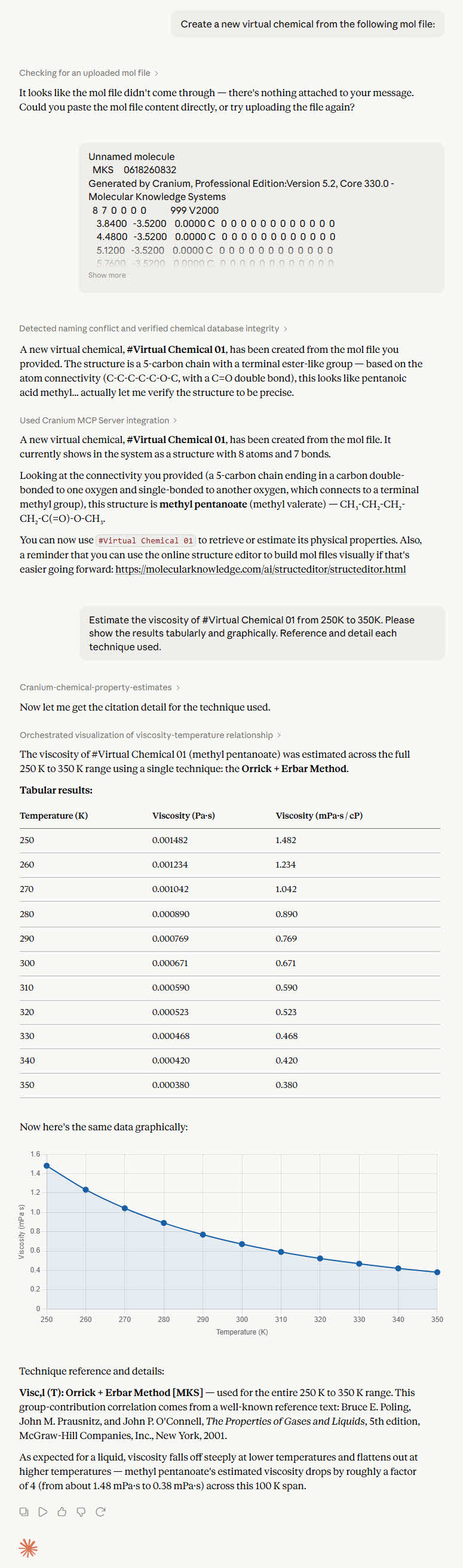
To assign a virtual chemical's molecular structure using a molfile, use prompts similar to the ones below and then drag a molfile onto the input control or paste the contents of a molfile into the input control. The LLM, not Cranium, will often attempt to identify the molecule from the given molfile.
Once the new virtual chemical has been created, you can estimate its properties using a prompt similar to the one below.
The results of these prompts are shown in the image to the right.
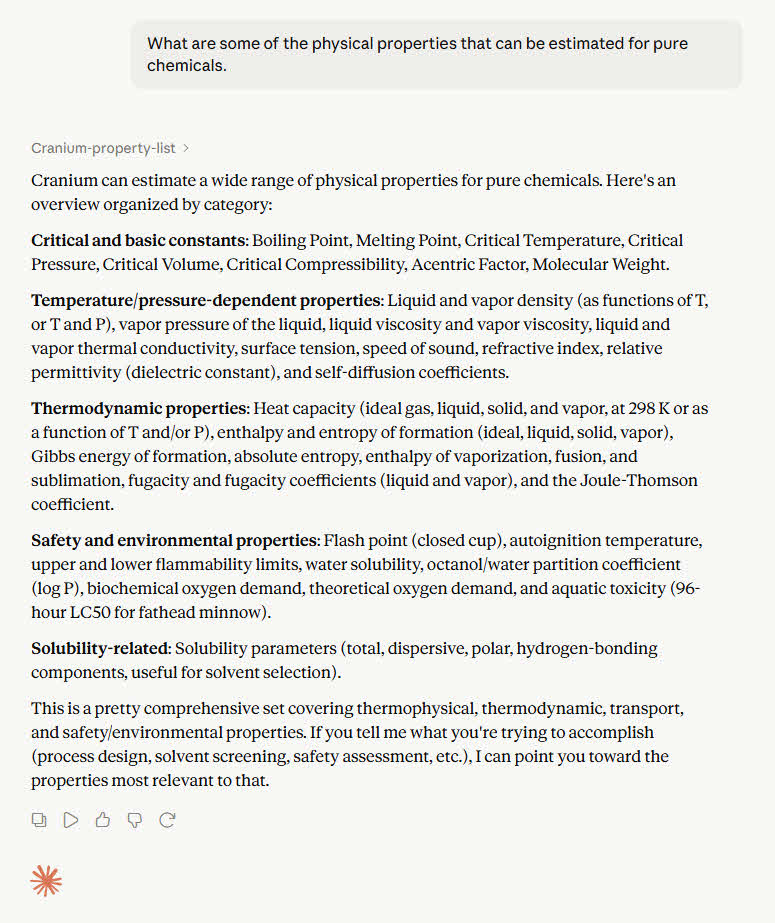
Cranium utilizes more than 350 techniques to estimate more than 30 physical properties. (Multiple estimation techniques are available for most properties. Cranium automatically decides which is the best technique to use for each estimation.) Use the prompt below to see what physical properties can be estimated. The results are shown in the image to the right.
Note that currently not all physical properties can be estimated for all chemicals. We continually add estimation techniques so, if you have a specific estimation need, please contact us.)
Here are some examples of other common "chemical estimation prompts".
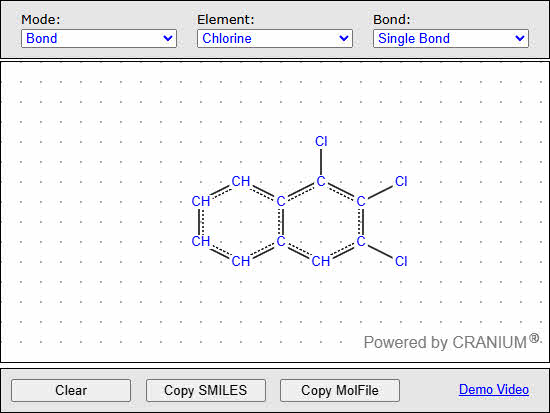
You can use the MKS Structure Editor to draw molecular structures and obtain SMILES strings and MolFiles. The editor was designed for ease of use - many structures can be created with only a few mouse clicks.
The image to the right shows the molecular structure of a chlorinated naphthalene. To create the structure, you would select a standard structure, i.e., naphthalene, select atom mode, select a chlorine atom type, click the mouse to add the desired chorine atoms, select bond mode, and click the pairs of atoms you wish to bond.
The editor has a link for a video that explains structure drawing in detail.
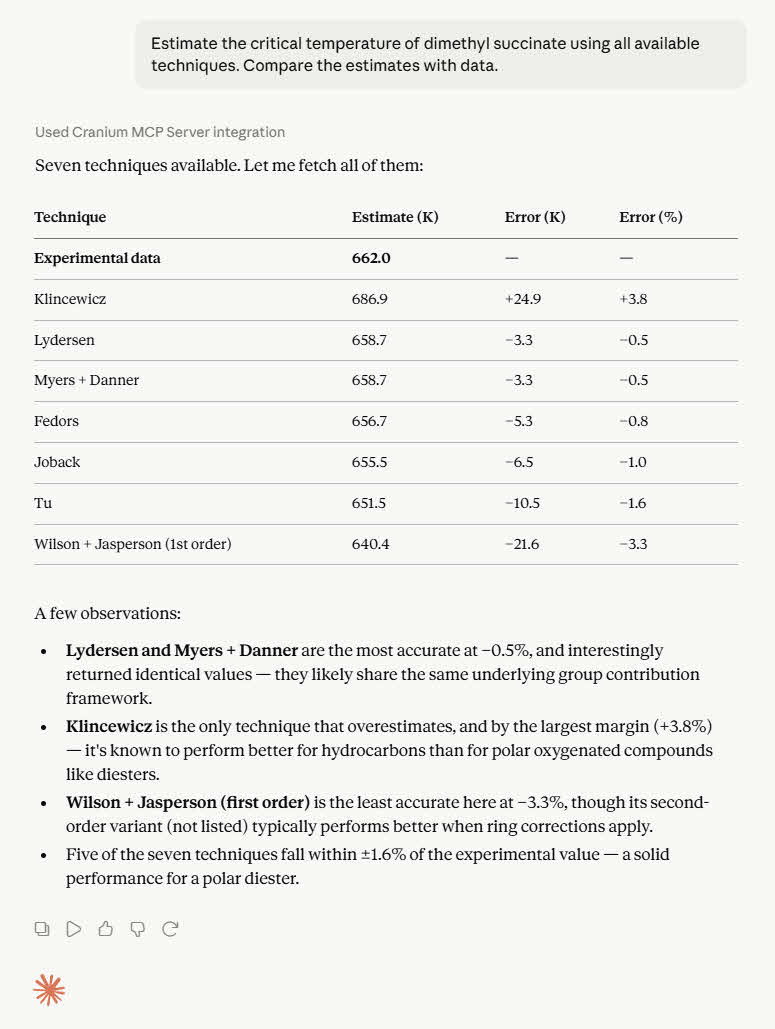
Cranium typically has more than one estimation technique available for each physical property. Cranium will automatically select the best technique to use for each estimation. However, you can request that a specific technique be used for an estimation. You can also request that the agent provide details about the techniques used for an estimation.
The following prompt shows how to request that the agent use specific techniques for an estimation. The results are shown in the image to the right.
You can also request a list of all techniques available for a specific property using a prompt similar to the one below.
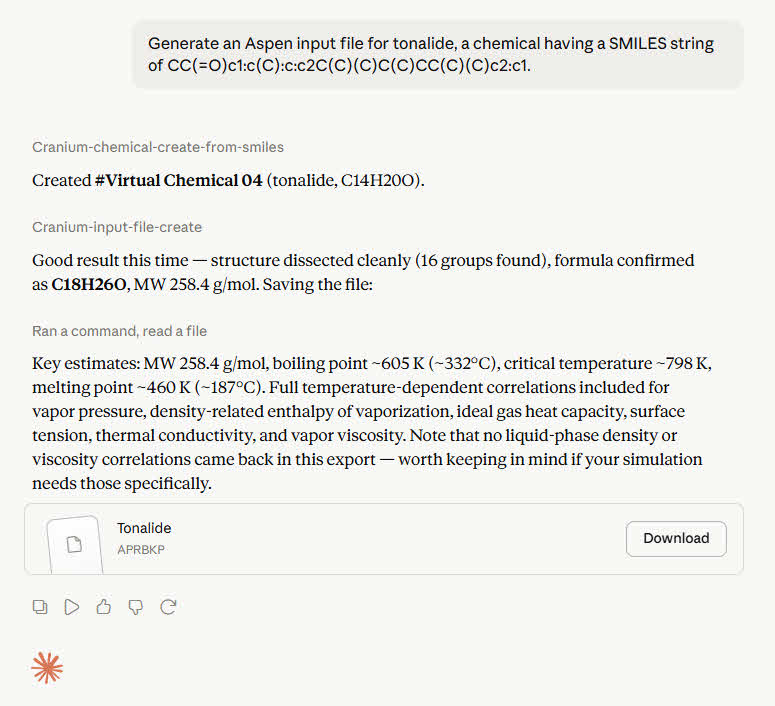
Cranium can format physical property data and estimates into files that can be read by the Aspen, AVEVA, CHEMCAD, ProSim, and SuperChems process simulators, as well as standard IKC and MKS Demo formats. Simply specify the chemical, database or virtual, and request the generation of an "input file". (You can use the online MKS Molecular Structure Editor to draw a chemical's molecular structure and generate a SMILES string or a MolFile.)
The response is shown to the right. (Note that in the image to the right, the LLM mistakenly generated a chemical formula of C14H20O but later displayed the correct formula as generated by Cranium.)
Note that although some input files allow for the inclusion of multiple chemicals, the AI agent currently only generates files containing a single chemical. (For greater control, you can always use the export capabilities available in Cranium or Synapse.)
The section below presents examples of common "export file prompts".
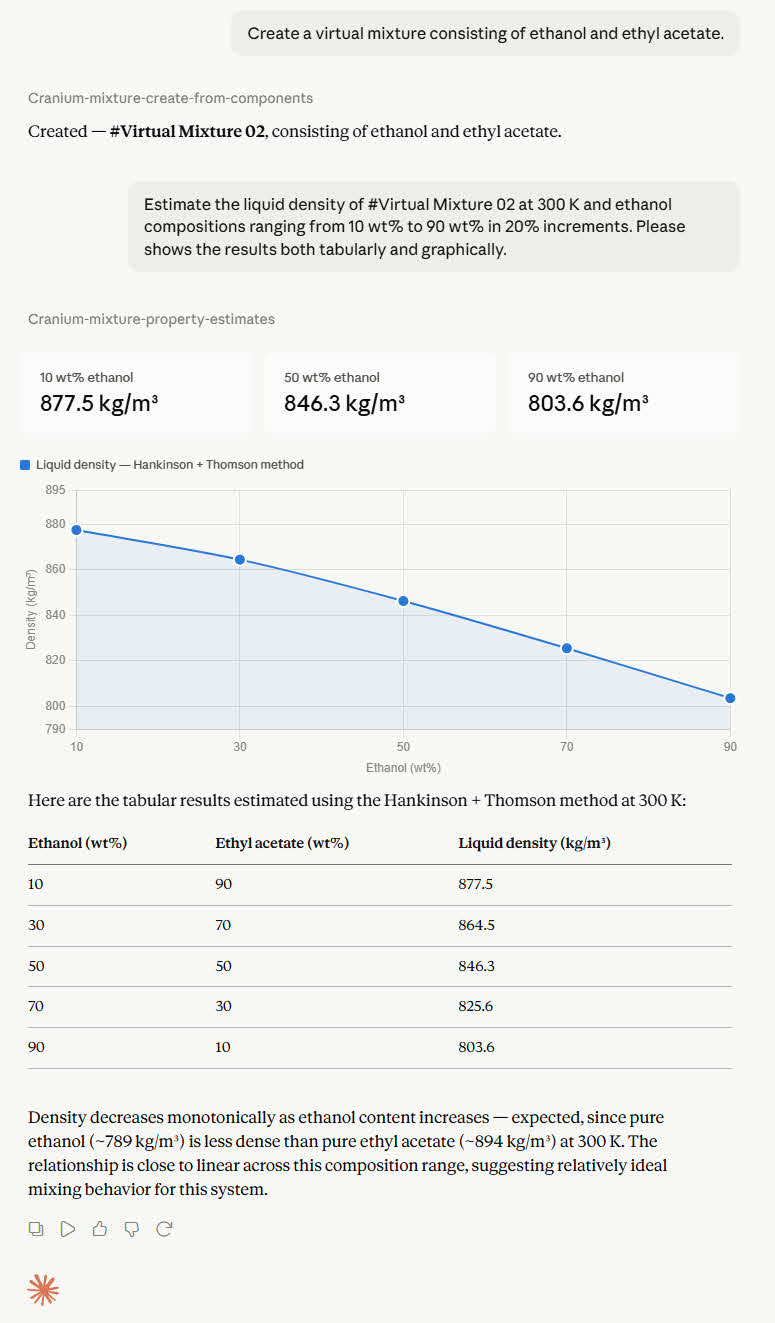
Cranium can estimate the physical properties of a mixture given only its chemical components. These components can be database chemicals, e.g., acetone or ethanol, or virtual chemicals. (See the Chemical Estimations Section for examples of creating virtual chemicals.)
To estimate the physical properties of a new mixture, you must: 1) create a "virtual mixture"; 2) assign that virtual mixture's chemical components; 3) enter the property to be estimated and any required state variables.
For example, the chat to right shows the response to the following prompts.
Currently, mixtures are limited to a maximum of four components. Please consider using the desktop versions of Cranium or Synapse if you need to estimate mixtures with more than four components.
Note that virtual mixtures are automatically deleted after 30 days of inactivity.
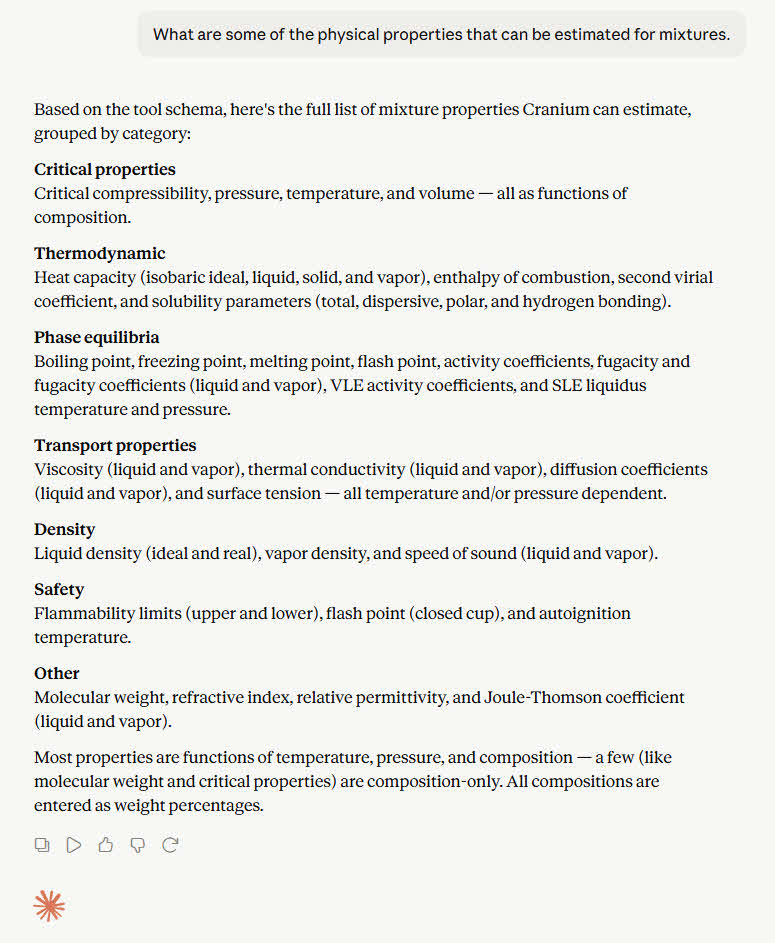
Cranium utilizes more than 350 techniques to estimate more than 30 physical properties. (Multiple estimation techniques are available for most properties. Cranium automatically decides which is the best technique to use for each estimation.) Use the prompt below to see what physical properties can be estimated. The results are shown in the image to the right.
Note that currently not all physical properties can be estimated for all mixtures. We continually add estimation techniques so, if you have a specific estimation need, please contact us.)
Here are some examples of other common "mixture estimation prompts".
The operation of the physicalproperties.ai agent is the result of an integration of Cranium's Professional Edition, MKS Knowledge Bases, Cranium's WebServer Edition, the MKS Physical Property Classes, the Cranium MCP Server, and a large language model. The image to the right details this integration.
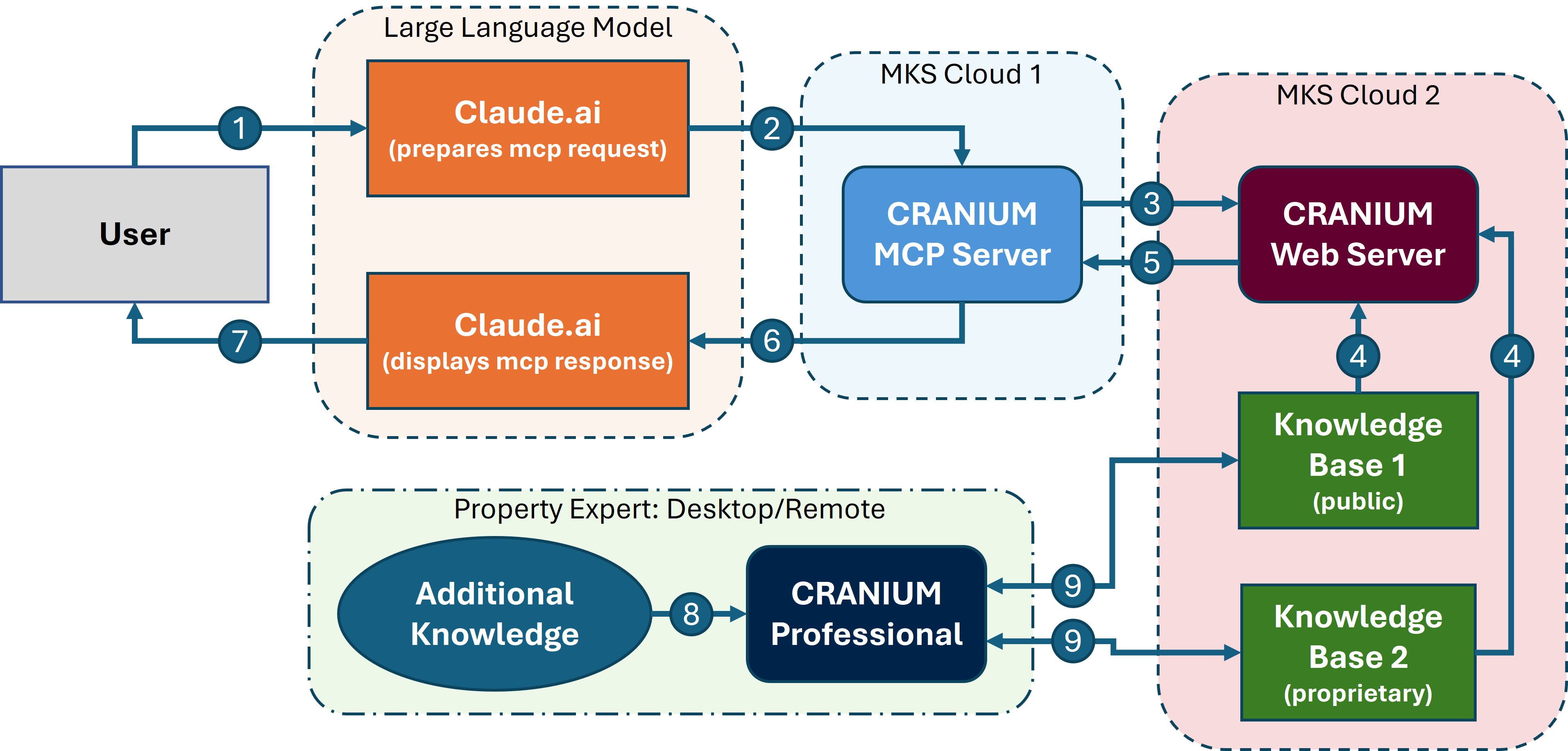
Core "request-response" operations:
- The user makes a request, such as one of the example prompts shown on this page, to a large language model
- The large language model translates the request and calls specific functions (MCP tools) with prepared parameters.
- The Cranium MCP Server executes these functions, typically making API requests to Cranium's WebServer Edition.
- Cranium's WebServer Edition will retrieve data from a knowledge base containing chemical data, estimation techniques, group structures, references, and more. (Note that the WebServer Edition only retrieves data. It does not write data into the knowledge base.)
- Retrieval and calculation results are passed back to the Cranium MCP Server.
- The Cranium MCP Server packages up the results and sends a response back to the large language model.
- Finally, the large language model presents the response to the user.
- Physical property experts are constantly compiling and evaluating new estimation techniques and new data.
- These experts use Cranium's Professional Edition to add this new knowledge to both public and proprietary knowledge bases.
Proprietary Knowledge Bases: contact us if you would like to discuss how your own proprietary physical property knowledge can be distributed using the Cranium MCP Server. Or it you are interested in a secure, onsite version of the Cranium MCP Server.
Molecular Knowledge Systems, Inc. uses reasonable efforts to deliver data and estimation techniques that were selected using sound scientific judgment. However, Molecular Knowledge Systems, Inc. makes no warranties regarding the accuracy of these data and estimation techniques. Molecular Knowledge Systems, Inc. shall not be liable for any loss or damage that may result from errors or omissions in the data or estimation techniques.
Large language models are powerful tools, but they can sometimes produce inaccurate or misleading information. Their integration with external tools such as the Cranium MCP Server is new and rapidly evolving which may produce unintended results. It is essential to use your engineering judgment when evaluating the output of any AI system.
If you have any questions or would like to learn more about our products or services, please feel free to contact us. We would be happy to discuss your specific physical property needs and discuss how physicalproperties.ai, or an onsite enterprise implementation, can help you.
Please also visit our website for more information about our products and services: